Imagine you are building your first full-stack project. It is a small online store. The front end looks good, and the API works. Then you hit a question: where should the data live?
This choice affects speed, cost, and growth. It also comes up in almost every backend interview. Two families of databases compete for your attention, and each has loyal fans.
This guide explains the SQL vs NoSQL database choice, how the two differ, and where each one fits. You will also get a clear answer on which one to learn first.
What Are Relational (SQL) Databases?
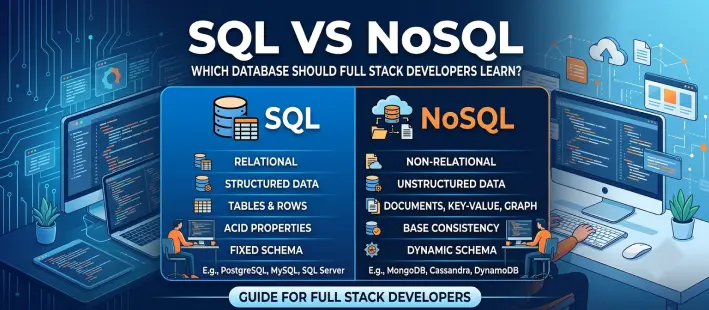
Relational databases store data in tables. Columns describe the data. Rows hold the records. MySQL, PostgreSQL, and Microsoft SQL Servers. You query all of them with SQL, short for Structured Query Language.
The core idea is structure. You define the shape of your data first, and the database enforces it. For example, a customer’s table links to an orders table through a shared ID. Each detail is stored once and reused. Keeps data consistent and avoids duplicates.
Relational databases also support ACID transactions. Suppose a payment fails halfway. The database undoes every step and leaves no half-finished record behind.
What Are NoSQL Databases?
Not every database needs rows and columns. NoSQL databases let you store data in the shape your app actually uses. The name usually means "not only SQL," since this family includes many different types.
There are four main types:
- Document Databases: MongoDB stores data as JSON-like documents.
- Key-Value Stores: Redis and DynamoDB link a key to a value, so lookups are very fast.
- Column-Family Databases: Cassandra spreads a huge amount of data for the AI machines.
- Graph Databases: Neo4j stores the large items and the links. It suits social networks and recommendations.
Because there is no rigid schema, you can change your data shape without a big migration. Many NoSQL systems also scale across several servers by design.
Difference Between SQL and NoSQL: Feature-by-Feature Table
This table covers the points that matter most in real projects.
| Feature | SQL (relational) | NoSQL (non-relational) |
|---|---|---|
| Data model | Tables, rows, and columns | Documents, key-value pairs, wide columns, or graphs |
| Schema | Fixed, set before saving data | Flexible, can differ between records |
| Relationships | Joins and foreign keys | Embedded data, or references handled in code |
| Scaling | Mostly vertical, with replicas and sharding as add-ons | Mostly horizontal by design |
| Transactions | Strong ACID support | Varies; many favor eventual consistency, some offer ACID |
| Query language | Standard SQL | Differs by database |
| Data integrity | Enforced by constraints | Mostly enforced in application code |
| Complex reports | Strong, with joins and aggregation | Possible, but often harder |
| Maturity | Decades of tools and learning material | Newer, but growing fast |
| Typical use | Finance, order systems, business apps | Catalogs, feeds, caching, real-time data |
SQL vs NoSQL in Real Projects: Practical Examples
Data Modeling: Tables vs. Documents
Take a blog post with comments. A relational database uses two tables: posts and comments. A post ID links them. A document database can store one document that holds the post and an array of its comments.
The document approach reads fast when you need everything together. It gets awkward when comments grow very large. It also makes searching comments across all posts harder.
Handling Payments and Transactions Safely
Imagine sending 500 rupees to a friend. One balance must go down, and the other must go up. A relational transaction guarantees that both steps happen, or neither does. That safety is why finance apps rely on it.
Adapting to Changing Requirements
Say you add a "gift wrap" option for only some products. In a document database, you add that field to the relevant documents. In a relational database, you plan a schema change or add a table. It is not hard, but it needs a migration. Many teams see planning as a feature because every change gets reviewed first.
Scaling When Traffic Grows
When users jump from thousands to millions, one server may struggle. Many NoSQL systems spread data across machines with little fuss. Relational databases can do this too, using replicas and sharding. It just takes more planning.
ACID vs. Eventual Consistency Explained Simply
When money or orders are involved, your database must never leave a job half done. That is what ACID protects. It stands for consistency, isolation, and durability. Each transaction finishes fully, follows your rules, runs without interfering with others, and survives a crash. Relational databases have built their reputation on these four guarantees.
Many NoSQL systems favor eventual consistency instead. Data may take a moment to match across servers. That is fine for a like counter on a social feed.
Ask yourself one question: what happens if a user sees slightly old data? Your answer will guide your choice.
| Database | Type | Positive | Negative | Uses |
|---|---|---|---|---|
| PostgreSQL | Relational | Powerful queries and joins, dependable consistency | Spreading data across servers takes planning | General apps, reports, and analytics |
| MySQL | Relational | Easy to start with, plenty of tutorials to learn from | Schema changes need planning | Websites and web applications |
| MongoDB | Document | Easy to change as your needs grow, handy for mixed data | Joins and reports are trickier | Product catalogs, content, and data that keeps changing shape |
| Redis | Key-value | Quick for basic reads and writes | Not built for complex queries | Caching, login sessions, and queues |
| Cassandra | Column-family | Simple to spread across many servers | Fewer shared standards, and joins are limited | Massive data with constant writes |
| Neo4j | Graph | Handles linked data naturally | Less suited to plain, table-style data | Recommendations and linked data |
SQL vs NoSQL Performance: Which Is Faster?
It depends on the job. Redis can return a single value in a blink. PostgreSQL handles reports with joins and filters well. Your query, your data size, and your setup matter too. Often, adding the right index helps more than switching databases. So test both with sample data that looks like yours before you commit.
SQL vs NoSQL: Which Is Better for Your Project?
There is no universal winner. The best choice depends on your data and your goals.
Go with a relational database if your data is structured, its parts are linked, and accuracy matters most, as with payments or orders.
Not sure yet? Start with a relational database. It is a safe choice for most business apps. If one feature later needs more flexibility or speed, add a NoSQL store for that feature alone.
Which Database Should Full-Stack Developers Learn First?
Start with a relational database. Almost every company uses one somewhere, and it trains you to think clearly about data. Once tables and relationships make sense, flexible databases are much easier to pick up.
Here is a simple path to follow:
- Master SQL Basics: Practice SELECT, INSERT, UPDATE, DELETE, JOIN, and GROUP BY until you can write them without looking them up.
- Connect a database to a backend: Pair PostgreSQL or MySQL with Node.js, Django, or Spring Boot.
- Try a Document Database: Build a small app with MongoDB, and note what feels easier and what feels harder.
- Add caching with Redis: Use Redis to speed up a slow page
- Combine SQL and NoSQL in One Project: Build one project that uses both a relational database and a NoSQL store, then put it on GitHub.
A working project tells a recruiter more than a long list of tools ever will.
Final Thoughts: Learn SQL First, Then Add NoSQL to Your Full Stack Toolkit
Relational and non-relational databases solve different problems, so a good developer learns both. Begin with tables, understand how data connects, and move to flexible options when your project calls for them. This order helps you in interviews and on the job.
If you want guided practice and mentor feedback on real-time projects that use both types, the full stack developer course in Chennai at AiiTE Academy gives you a clear structure. Choose a program with hands-on labs, and start building this week.
Frequently Asked Questions
Not always. NoSQL feels easy at first because there is no fixed schema. But if you design your data carelessly, the problems show up later. SQL is harder to start with, yet its rules keep you on track.
Yes, and many teams do. A shop might keep your orders in PostgreSQL, product details in MongoDB, and login sessions in Redis. Keep your setup simple until the project truly needs more.
No. Learn one document database, such as MongoDB, and one key-value store, such as Redis. That pair covers most beginner needs and many job requirements.